BYROW is a clean way to work with arrays.
Example:
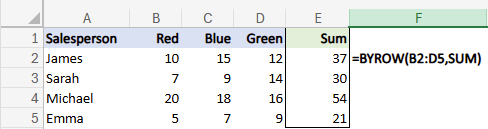
=BYROW(B2:D5,SUM)
This takes each row in the range (B2:D5):
• Applies the SUM function
• Returns a spilled array of results
One formula:
→ multiple calculations
→ multiple results
Before dynamic arrays, you’d typically:
• Add helper columns
• Copy formulas down row by row
• Maintain ranges manually
Now:
→ Excel handles the entire array in a single formula.
Why this matters:
• Cleaner spreadsheets
• Fewer copied formulas
• Easier to maintain as data grows
This is one of those functions that changes how you think about Excel:
Less cell-by-cell… more array-by-array.
Note: the syntax uses SUM but no (), this works with a range of functions, e.g. MAX, AVERAGE, COUNT etc